
- Home
- Services
- Use Cases
- How it Works
- API Reference
- Introduction
- Authentication
- Endpoints
- Actions
- Appointments and Calendar
- Auth
- Channels
- Costs and Subscription
- Customer Custom Fields
- Customers
- Documents
- End Users
- Error Codes
- File
- Hooks
- Knowledge Bases
- Mailings
- Place Descriptions
- Rate Limits
- Representatives
- Ticket Messages
- Tickets
- Topics
- Translations
- Voice and Transcription
- Webhooks
- WhatsApp and SMS
- Best Practices
- Support
- About Us
- Blog
- 🇧🇪NL
Introduction
API Reference: Introduction
What the AnswerPal API is
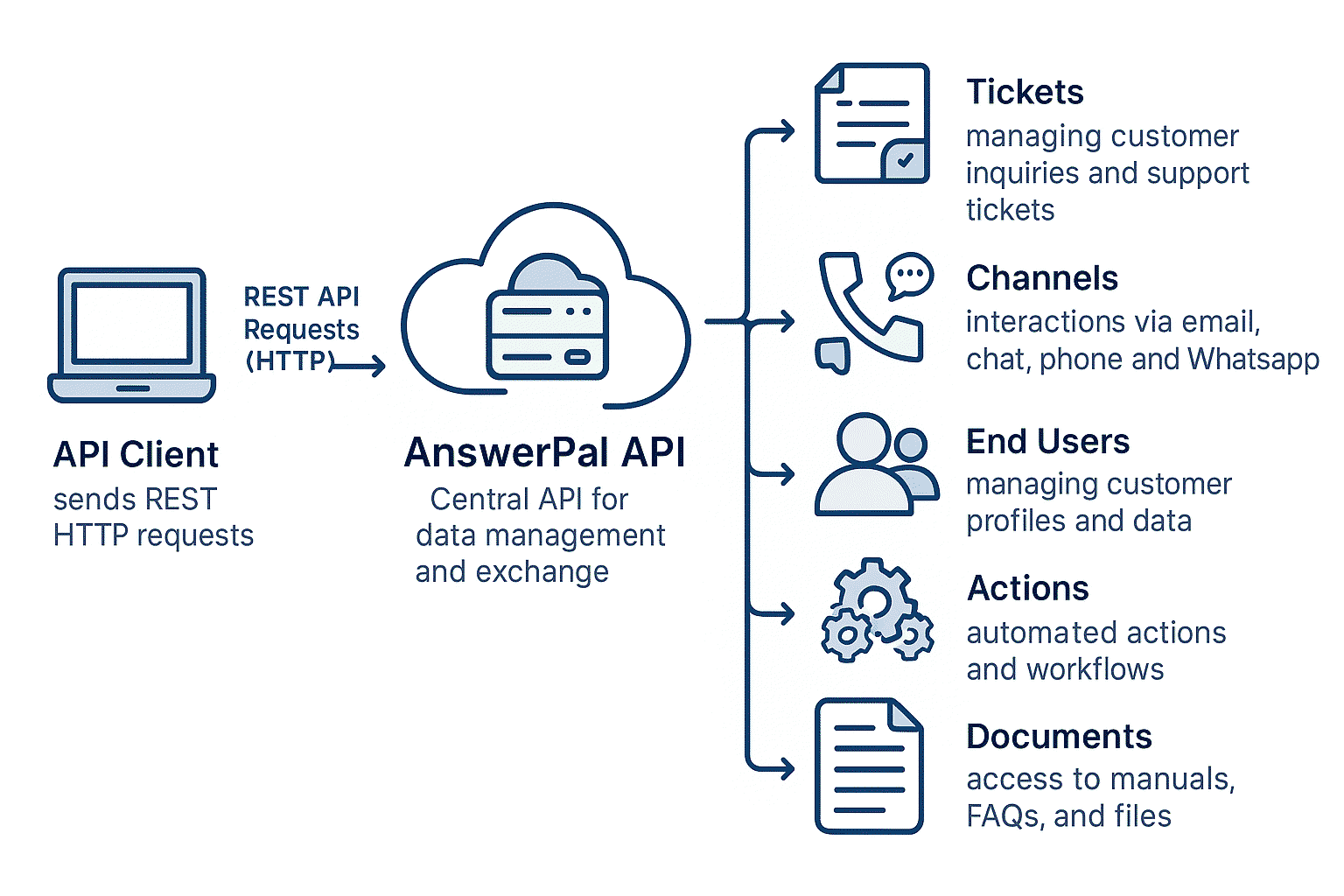
The AnswerPal API is the REST API behind the AnswerPal portal. The portal itself uses it for tickets and messages, channels, topics, actions, documents, end users, representatives, mailings and more, so an integration can do the same things under the same rules.
Every call runs on behalf of one signed-in representative of a customer account, or of a phone session, and only sees the data of that customer. What a call may do follows the representative’s role.
What you can do with it
- Tickets and messages
Read and update tickets, add messages, send replies through the ticket’s channel and run actions on a message. - Channels and users
Manage e-mail, chat, phone, SMS and WhatsApp channels, representatives and end users. - Automation setup
Topics, actions, hooks and documents that steer how AnswerPal classifies and answers messages. - Knowledge bases
Upload and manage the files AnswerPal searches when it answers. - Mailings, appointments, voice and place descriptions
Available when they are part of the customer’s subscription.

RESTful JSON API
Standard HTTP methods and JSON payloads for easy integration.

Secure Authentication
Uses JWT Bearer tokens for secure access to protected endpoints.

Automation
Actions run at hooks such as topic detection, an escalation or a closed ticket, and can call the APIs of your own systems.

Extensible & Flexible
Map custom fields, connect to external APIs, and tailor workflows to your needs.
Base URL and requests
- Base URL
https://api.answerpal.eu. Every endpoint path starts with/api/, for examplehttps://api.answerpal.eu/api/Tickets. Always use HTTPS. - Paths
Paths are not case-sensitive:/api/ticketsand/api/Ticketsreach the same endpoint. This reference writes them as AnswerPal declares them. - Bodies
Send JSON withContent-Type: application/json. File uploads usemultipart/form-data, and a few endpoints return a file, a CSV export or an HTML page instead of JSON; their pages say so. - Versions
There is one version of the API and no version number in the URL.
GET /api/CustomerCustomFields?appliesTo=EndUser HTTP/1.1
Host: api.answerpal.eu
Authorization: Bearer <token>
Accept: application/json200 OK
Content-Type: application/json; charset=utf-8
[
{
"customFieldDefinitionID": 18,
"fieldName": "membership",
"fieldType": "dropdown",
"appliesTo": "EndUser",
"displayName": "Membership",
"description": null,
"order": 2,
"options": ["Basic", "Gold", "Platinum"],
"endUserValueCount": 42
}
]JSON conventions
- Property names
Responses use camelCase, for exampledisplayNameorcustomFieldDefinitionID. In request bodies the letter case of property names does not matter. - Enum values
Written as their name, for example"role": "Agent". In a request the API accepts the name in any letter case, and also the numeric value. - Empty values
Returned asnull; the property is not left out. In a request, a property you leave out gets its default value, so send every field when an update replaces a resource. - Dates and times
ISO 8601 strings. - Lists
Most list endpoints return a JSON array. Paged lists takepageNumberandpageSize; their endpoint page shows the response shape. - Errors
Error bodies do not all have the same shape. See Error Codes.
Authentication
Sign in with POST /api/Auth/login, using the username and password of a representative and the host name of the customer’s AnswerPal portal. The answer holds a JWT that is valid for 12 hours. Send it on every other call as Authorization: Bearer <token>. There are no separate API keys: an integration signs in as a representative and gets that representative’s role. Read Authentication for the details.
How this reference is organised
- Endpoints
All public endpoints by category. Each category has its own page with the endpoint list, the fields, examples, status codes and a short FAQ. - Access line
Every endpoint shows who may call it: the roles that are allowed, whether a phone token works, a token in the link itself (the link is the credential), or public (no token: sign-in, public links, and the webhooks that Microsoft and Twilio call). - General pages
Authentication, Error Codes, Rate Limits and Best Practices. - Real-time updates
The SignalR hubs/chatHuband/ticketHubpush live updates to the portal. They take the same token, also as theaccess_tokenquery parameter.
There is no public OpenAPI (Swagger) document; this reference is the documentation of the public API.
Architecture
FAQ
No. Calls to AnswerPal use the JWT from POST /api/Auth/login. Create a representative account for your integration and give it the role it needs.
Yes. An action can call an external API, for example your CRM, and a document can fetch its content from one; AnswerPal uses the credentials stored on the customer, or the override on the action or document. There is no general webhook subscription that pushes events to a URL of your choice.
No public one. Use the endpoint pages of this reference; they are written from the API code.
Need more help?
Table of Contents

AnswerPal: AI-powered customer service solutions to elevate your support and communication effortlessly.
Quick Links
Contact
For all support, sales, and partnership inquiries, email us at info@answerpal.eu
AnswerPal
Bisschoppenhoflaan 380
2100 Antwerp
Belgium
+32.36416685
BE 0862.692.858