

More customer enquiries, longer phone calls or a busy period: your use of AnswerPal can vary from month to month. Budget monitoring shows you how much of your usage budget you have used. Your administrator receives an alert when an important threshold is reached, helping you review whether the budget still fits the way you work.
The current period at a glance
Under Reports > Costs, an overview of the current contract period appears above the cost report. It shows the period budget, recorded usage, remaining budget and percentage used. If you have exceeded the budget, it also shows the amount over budget. A progress bar makes the balance easy to see.
The start and end dates make it clear which period the figures cover. Even when you select a different month in the historical report, the budget overview continues to show the current contract period. You can look back while keeping your current budget position in view.
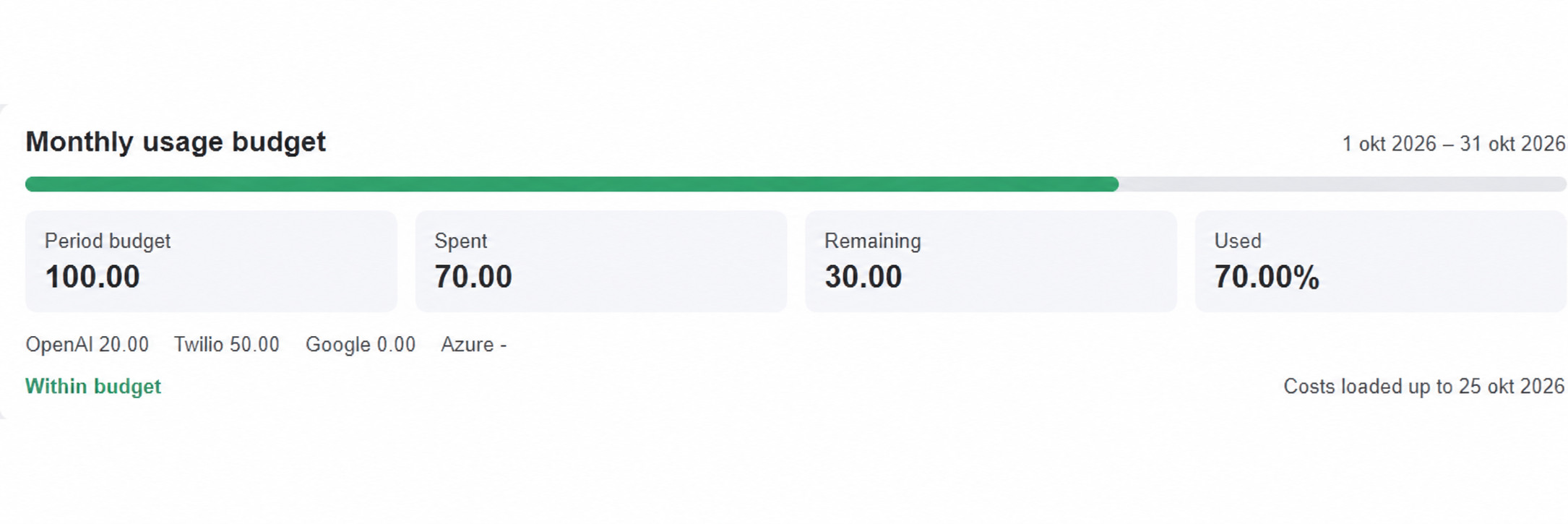
Example: more enquiries during a busy month
A service company receives more phone enquiries than usual during a busy month. The person responsible receives an alert and sees that 82% of the monthly budget has been used. From the notification, they open the cost report to see how recorded usage has developed over the past few days.
This is a useful moment to discuss the expected workload for the rest of the month. Is the peak temporary, or is the increase in usage part of a longer-term trend? The budget overview gives the team a concrete starting point for that conversation, without anyone having to gather individual figures first.
Alerts at the right moments
AnswerPal monitors three thresholds: 80%, 90% and 100% of the period budget. Active administrators with an email address receive an alert by email. Team members with access to reports also see a notification at the top of the application from 80% onwards, with a link to the cost report.
If a daily update takes usage past several thresholds at once, only the highest applicable alert is sent. The administrator receives the notification that reflects the current situation.
Using up your usage budget does not stop your service: AI replies, phone calls and other services continue. The alert does not automatically trigger an additional charge either. It helps you monitor usage and decide on the appropriate next step.
Knowing how up to date the figures are
The overview follows costs recorded each day. You can see the date through which the data has been loaded. If data is missing or out of date, AnswerPal indicates this explicitly. The remaining budget is then marked as provisional.
This makes it clear whether you are looking at a complete overview or a position that may still change. New calls and messages can use part of your budget before their costs appear in the next daily update.
A budget that matches your contract period
For a monthly contract, the budget follows the calendar month. If an annual contract has been configured, a single budget applies to the contract year: twelve times the monthly budget, available to use across those twelve months. A busier month therefore does not necessarily use up the available annual budget. The budget resets at the start of a new contract period; unused budget does not carry over.
Would you like to discuss which usage budget fits your organisation? Contact AnswerPal. We will be happy to review your usage and configured contract period with you.
