

A customer calls about a delivery. While AnswerPal looks up the details, the customer adds something: the order needs to go to a different branch. Phone conversations do not pause neatly after every question. People add details, clarify what they mean and respond to each other while information is being gathered in the background.
GPT Live brings this style of conversation to AnswerPal. The voice model handles the conversation, while a separate model can look up information, prepare an answer or have a configured action carried out. The redesigned model settings make these roles clear: you choose both a Conversation model and an Answer support model.
What does full duplex mean for a phone conversation?
GPT Live can listen and speak at the same time. This is called full duplex. A caller can add a detail during an explanation while the model continues to follow the spoken interaction. The conversation can also continue while work is being done in the background.
This is the architecture OpenAI describes for GPT Live: a continuous conversation with separate support in the background. For the caller, it remains one conversation; behind the scenes, the two models have different roles.
Two models, each with a clear role
Conversation model: the voice on the phone
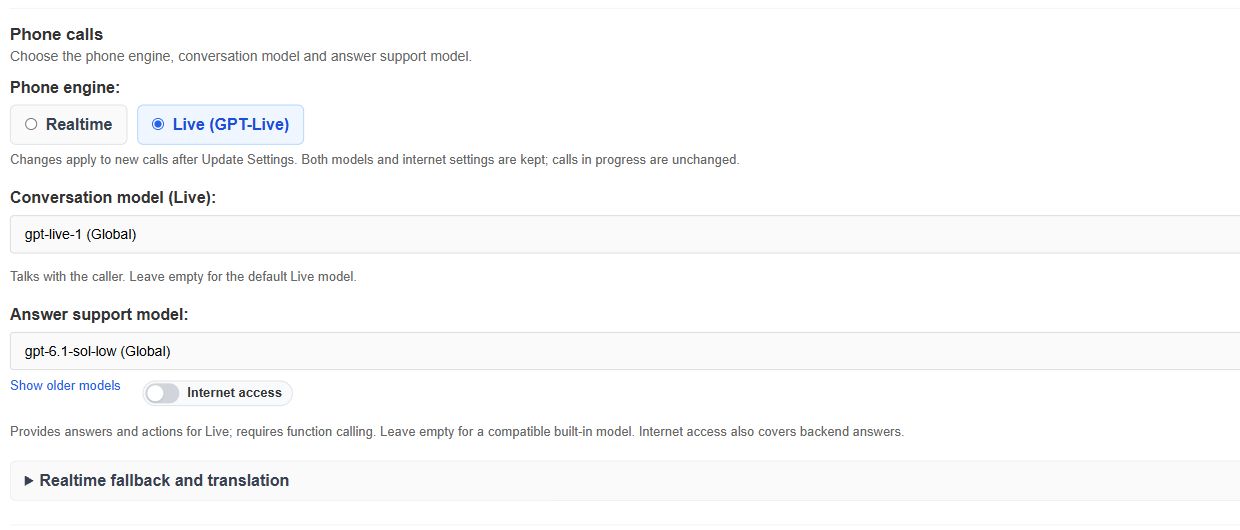
Under Conversation model (Live), you select the model that listens and speaks. In the example shown, this is gpt-live-1. It handles the spoken interaction and calls on support when a question requires information to be gathered or an action to be carried out.
Answer support model: preparing answers and carrying out actions
The Answer support model handles the work in the background. It uses the configured knowledge, instructions and available tools to retrieve information, prepare an answer or have an action carried out through a connected system.
A service company could use product information to help answer a maintenance question over the phone. With a connection to its scheduling system, the background work could also include looking up an available appointment. GPT Live handles the conversation and presents the result to the caller.
You choose this supporting model separately from the voice model. For Live, it must be able to invoke actions and tools; the settings refer to this as function calling. The screenshot shows gpt-6.1-sol-low as an example of a model pairing.
How does this differ from the Realtime engine?
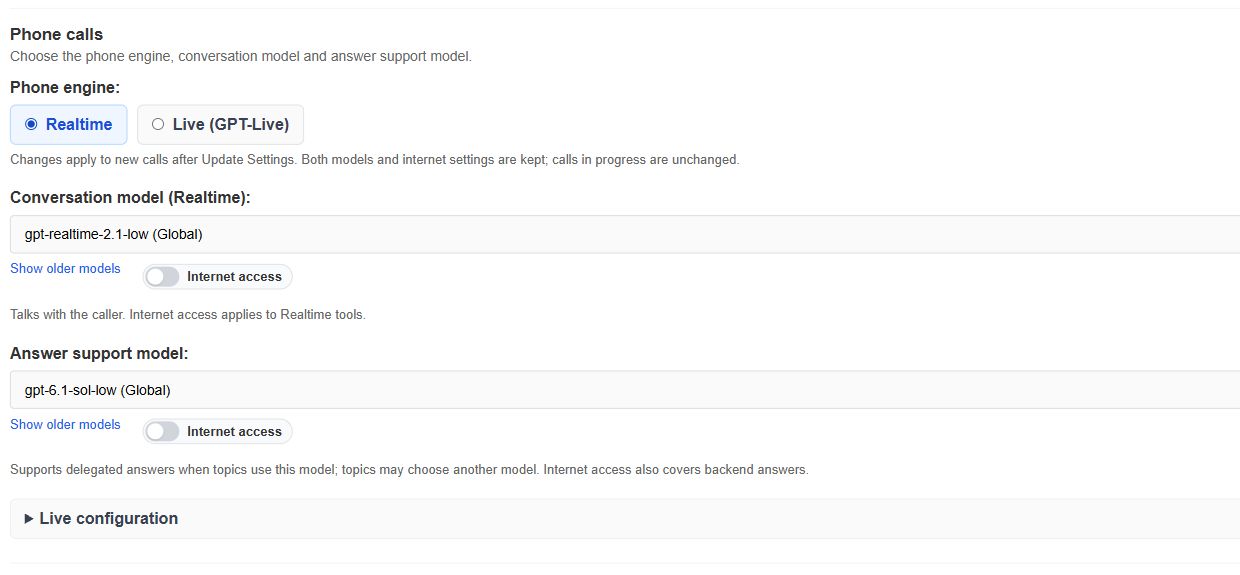
The Realtime engine remains available in AnswerPal. It centres on a voice model that understands audio, forms answers and can invoke tools within the same session. Realtime also supports interruptions. Within AnswerPal, a topic can additionally use a separate text model to help prepare an answer.
With Live, the division between conversation and background work is an explicit part of the architecture: the Live model handles the entire voice interaction and delegates the information-gathering work to the selected supporting model. This is particularly relevant when the caller continues speaking while information is retrieved or actions are processed. OpenAI describes these two approaches in its overview of voice agents.
| Setting or behaviour | Live (GPT-Live) | Realtime |
|---|---|---|
| Handling the conversation | Live model that can listen and speak at the same time | Realtime voice model with turn-taking and support for interruptions |
| Preparing answers and actions | Separate Answer support model for delegated answers and actions | The Realtime model can use tools; topics can call on a text model |
| Model selection in AnswerPal | Conversation model (Live) and Answer support model | Conversation model (Realtime), with support according to the topic settings |
You can therefore choose the engine that suits your phone workflow and the way you want the conversation and background processing to work together.
Clearer model settings
In Customer Settings → Model Settings, models are now grouped by function. Under Phone calls, you can immediately see which engine is selected, which model speaks to the caller and which model supports the answers.
The other settings are grouped too:
- Messages: the models for chat messages and email replies.
- Analysis and processing: topic detection, ticket summaries, conditions and spam detection.
- Audio and translation: transcription, translation during phone calls and text translation.
This layout helps you find the setting for a particular task. If you select an unsuitable or unavailable model, a message appears next to the relevant field.
Test conversations before everyday use
Moving from Realtime to Live changes both the way conversations are handled and how the models work together. We therefore recommend making a few representative test calls before using GPT Live for your day-to-day phone calls. The same advice applies when you choose a different voice model or Answer support model.
Try a routine customer question, a conversation in which the caller adds a detail or interrupts, and a situation that involves looking up information or carrying out an action. Check that the conversation flows naturally, the answers meet your expectations and the requested actions are carried out correctly. This helps you identify any instructions or settings that need adjustment.
How to select Live and its models
- Open Customer Settings and go to Model Settings → Phone calls.
- Select Live (GPT-Live) under Phone engine.
- Under Conversation model (Live), choose an available Live model, such as gpt-live-1.
- Under Answer support model, choose a suitable model for preparing answers and carrying out actions. This model must support function calling.
- Save with Update Settings. The selection applies to new calls; calls already in progress retain their engine.
Where Use the system default is available, you can also use the system’s choice. Making an explicit selection shows which combination you intend to use and test.
Your saved Realtime settings remain available under Realtime fallback and translation. They may still be needed for fallback and certain translation scenarios. When you switch engines, AnswerPal retains both model selections and their associated internet settings.
Would you like to use GPT Live for your customer phone enquiries? Contact AnswerPal. We can help you choose the model combination and setup that fit your workflow.
