

Not every customer request can wait until someone next opens the ticket list. A technical fault may be holding up a delivery, or a conversation may need a member of staff to step in. With automatic notifications, AnswerPal can alert the right person by SMS or email when a configured topic or event triggers the action.
The colleague receives a targeted alert without having to monitor every conversation. You decide in advance which situations need attention, who receives the notification and what information it contains.
Example: a fault that needs attention today
A customer emails to report that a supplied machine has stopped working, bringing their work to a halt. Your organisation has set up the topic Urgent technical support for these messages. You link that topic to a notification for the person responsible for technical support.
When processing the message triggers that action, AnswerPal sends the notification through the selected channel. The original request does not have to arrive by SMS: an email or chat message can also trigger an SMS alert.
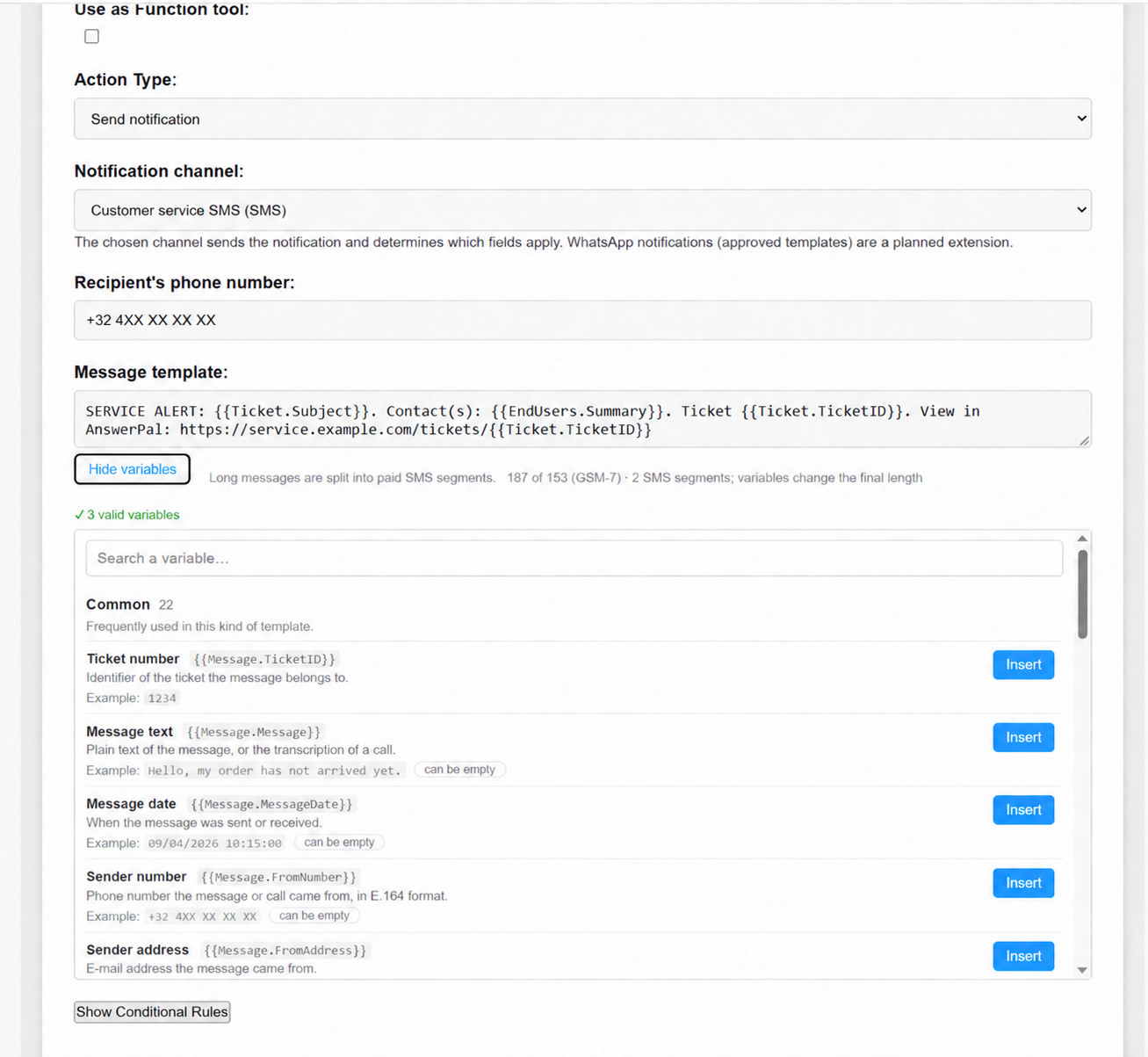
A useful notification might include the ticket subject, known contacts and ticket number. The recipient can then open the conversation in AnswerPal and assess what is needed. This internal alert is separate from the reply to the customer.
How to set up a notification
A member of staff with the Configurator or Administrator role can configure the action.
- Create the action. Open Settings > Actions, choose Add New Action, give it a clear name and select Send notification as the Action Type.
- Choose the sending channel and recipient. Under Notification channel, select an active SMS or email channel from your own environment. For SMS, enter one phone number in international format. For email, you can set To, optionally CC and BCC, and a subject.
- Write a short message. Use Insert variable to add details such as the ticket subject or contact information.
{{EndUsers.Summary}}lists the contacts found; it is not a summary of the conversation. Include only the information the recipient needs. - Link the trigger. Use Topics on the action row for a particular topic, or Events for an event such as OnEscalate, when human assistance is requested. Select the intended source channels and make sure Is Active is enabled. Creating the action alone is not enough to start receiving automatic notifications.
Check the wording first, then test the workflow
Read through the message and check that it gives the recipient enough context. Allow for missing contact details too: the notification should still make sense without them.
Then run an agreed practical test using a non-critical test message and your own test recipient. Check both a situation that should trigger an alert and an ordinary enquiry that should not. Also confirm that the notification reaches the intended recipient; correct wording alone does not prove that the setup is working.
Keep alerts focused and manageable
SMS messages can be split into several chargeable segments. The counter beside the message helps, but substituted variables change the final length. Keep the text short.
A new message can trigger another notification, even within the same ticket. Choose the trigger carefully. These operational notifications do not replace an emergency procedure or guarantee an immediate response. Agree who will follow up and what happens if that person is unavailable.
Would you like urgent enquiries to reach the right colleague automatically? Contact the AnswerPal team. We can help you set up an appropriate notification and test scenario. You can also explore the October 2026 product update.
